
Compare Teachable vs Thinkific to understand their features, pricing, course creation tools, marketing capabilities, and student experience.
TL;DR
- Teachable is a strong option for creators focused on selling online courses, coaching services, and digital products.
- Thinkific is suitable for educators who prioritise structured course delivery, assessments, student engagement, and community features.
- Course creation: Both platforms provide tools to create, organise, and sell online courses, but their features and workflows differ.
- Pricing: Compare subscription plans, transaction fees, payment processing costs, and additional expenses before choosing.
- Best choice: Teachable may suit creators focused on monetisation, while Thinkific may better serve educators who need more structured learning management. Your goals, budget, and teaching requirements should guide the decision.
Creating and selling online courses requires more than valuable content; it also requires a platform that can support course delivery, student management, and business growth.
The growing reach of course platforms highlights their role in digital education.
According to Teachable’s 2025 review, its creators reached over 95 million lifetime students. Meanwhile, Thinkific reports reaching 214 million learners.
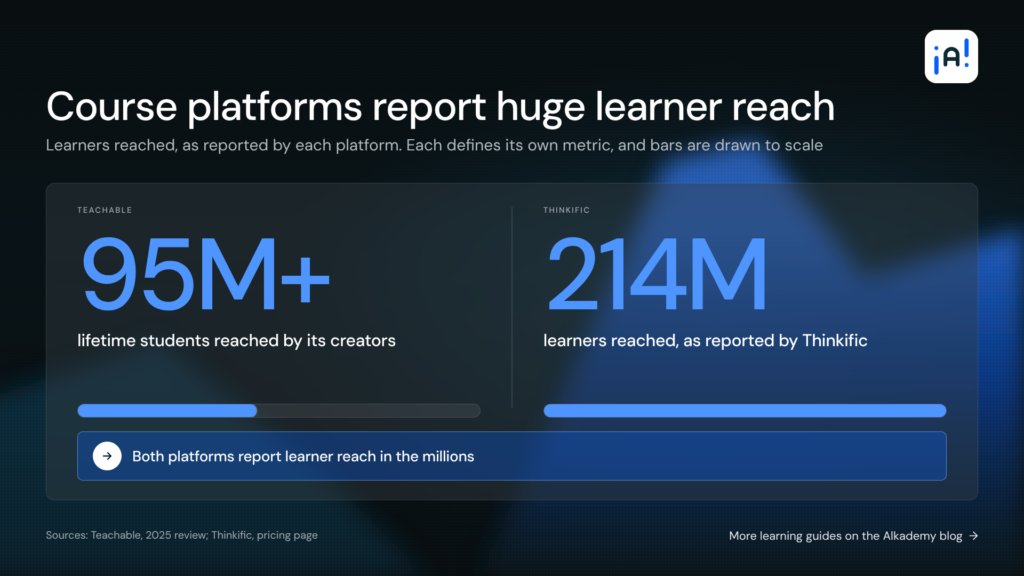
However, reach alone doesn’t determine which platform is right for your business. This guide compares their features, pricing, and capabilities to help you choose the one that best fits your goals.
Table of Contents
What Is Teachable?
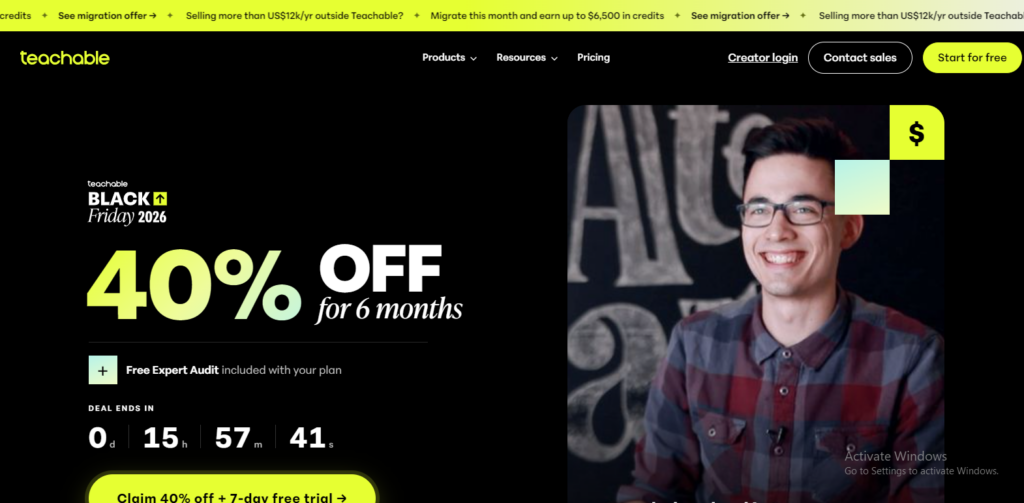
Teachable is an online course creation and selling platform designed for educators, coaches, and entrepreneurs who want to turn their knowledge into digital products.
It combines course hosting, student management, payment processing, and marketing tools in one platform. Creators can develop lessons, upload educational materials, build sales pages, and manage enrolments without developing their own course management system.
Teachable also supports coaching services, memberships, and downloadable resources, making it useful for creators who want to generate revenue through different educational offerings.
Key Features of Teachable
- Course Creation: Build courses using videos, text lessons, and downloadable materials.
- Website Builder: Create branded websites and sales pages.
- Student Management: Organise enrolments and monitor learner progress.
- Payment Processing: Accept payments through supported payment methods.
- Marketing Tools: Use discount codes, affiliate marketing, upsells, and abandoned cart recovery.
- Coaching Products: Create and sell coaching services alongside traditional courses.
- Analytics: Monitor sales performance and student activity.
Pros and Cons of Teachable
Pros
- Combines course creation and selling tools.
- Supports multiple digital product formats.
- Provides built-in checkout and payment capabilities.
- Offers promotional and affiliate marketing features.
- Helps creators manage courses and student enrolments.
Cons
- Some advanced features require higher subscription plans.
- Platform transaction and payment processing fees can affect profitability.
- Customisation options may be limiting for businesses with specialised requirements.
- Payment availability varies by country.
What Is Thinkific?
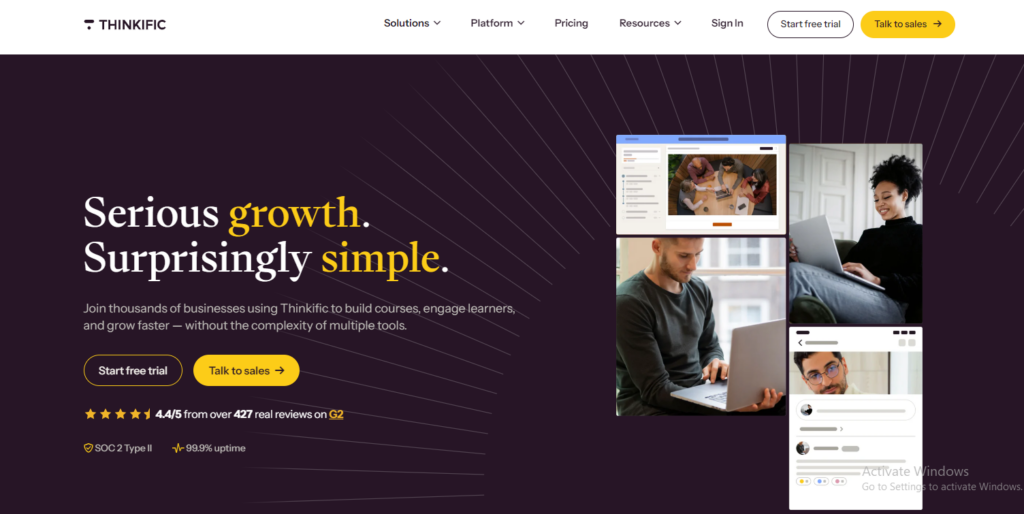
Thinkific is an online course creation platform that helps educators, entrepreneurs, and organisations develop and deliver structured learning experiences.
It provides tools for organising course materials, creating lessons, managing students, and selling educational products. Creators can incorporate videos, presentations, text, quizzes, and assignments into their courses.
Thinkific also offers community features that allow learners to interact beyond individual lessons. This makes it useful for educators and businesses that want to combine course content with more engaging learning activities.
Key Features of Thinkific
- Course Creation: Develop courses using multimedia lessons and downloadable resources.
- Website Builder: Create branded websites and landing pages.
- Student Management: Organise learners and monitor course participation.
- Quizzes and Assignments: Evaluate students’ understanding through different assessment activities.
- Community Features: Encourage discussions and interaction among learners.
- Marketing Tools: Promote courses, memberships, and subscriptions.
- Integrations: Connect supported third-party applications.
- Analytics: Monitor revenue, course performance, and learner engagement.
Pros and Cons of Thinkific
Pros
- Provides structured course creation tools.
- Supports quizzes, assignments, and certificates.
- Offers community and student engagement features.
- Includes website-building and sales capabilities.
- Supports integrations with other business applications.
Cons
- Subscription costs may be higher than some alternatives.
- Certain advanced features are restricted to higher-tier plans.
- Some customisation requirements may involve additional tools.
- External applications can increase operating costs.
Teachable vs Thinkific: Key Differences
Before examining individual features, it helps to understand how the two platforms differ in their overall approach.
| Comparison Factor | Teachable | Thinkific |
| Primary focus | Course sales and digital product monetisation | Structured course delivery and learning management |
| Ideal users | Independent creators, coaches, and entrepreneurs | Educators, training providers, and organisations |
| Learning approach | Straightforward, creator-led courses | Structured learning with varied activities |
| Assessment options | Quizzes and short-answer questions | Quizzes, assignments, and surveys |
| Marketing approach | Built-in promotional and sales tools | Sales features and third-party integrations |
| Digital products | Courses, coaching, and downloads | Courses, memberships, and bundles |
| Student engagement | Progress tracking and course dashboards | Communities and learning activities |
| Customisation | Branded websites and sales pages | Customisable websites and online school |
The main distinction is that Teachable places considerable emphasis on monetisation, while Thinkific provides additional options for organising and delivering structured learning experiences.
Teachable vs Thinkific: Features Compared
Both platforms provide the tools needed to operate an online course business.
However, their differences become more apparent when you consider how each handles specific tasks.
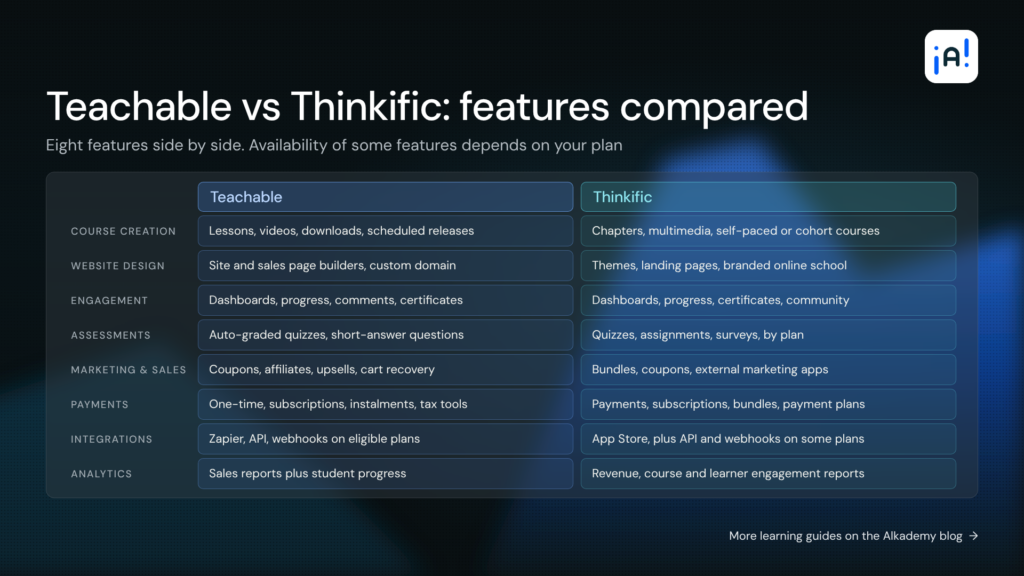
Their main features include:
Course Creation and Management
Teachable provides a course builder that allows creators to organise lessons, upload videos, add downloadable resources, and schedule content releases. Its course creation process works alongside its digital product and sales management tools.
Thinkific supports multimedia lessons, chapters, quizzes, assignments, and structured learning activities. It also provides options for self-paced and cohort-based courses, depending on the available plan.
Which is better?
Thinkific is worth considering if your courses require more structured learning activities. Teachable is a practical choice if you want to create courses and manage other educational products within the same platform.
Planning and launching a course also involves choosing your topic, structuring lessons, and finding ways to attract learners. Our guide on how to create and sell online courses covers these steps in more detail.
Website Design and Customisation
Your course website is where potential students discover your offerings, review course information, and decide whether to enrol.
Teachable provides website and sales page builders, branding options, and custom domain support. These tools help creators establish an online presence without developing a website from scratch.
Thinkific also offers website themes, landing pages, and customisation options. Creators can organise their course catalogues and present educational products through a branded online school.
Which is better?
Both platforms provide the essential website-building capabilities most independent creators need. Compare their available templates, design flexibility, and branding options before choosing.
Student Engagement and Learning Experience
A successful online course should make it easy for students to navigate lessons, follow their progress, and interact with learning materials.
Teachable provides student dashboards, progress tracking, lesson comments, and certificates. These features support a straightforward learning experience.
Thinkific offers learner dashboards, progress tracking, certificates, and community features. These capabilities allow creators to incorporate discussions and other engagement activities into their courses.
Which is better?
Thinkific may be more suitable if you want to build a learning environment that encourages student interaction. Teachable is a good option for creators who prefer straightforward course delivery and progress monitoring.
Quizzes and Assessments
Assessments help instructors determine whether students understand what they have learned. They also give learners opportunities to review concepts and demonstrate their knowledge.
Teachable supports quizzes, including auto-graded assessments and short-answer questions.
Thinkific offers quizzes, assignments, surveys, and other assessment options, depending on the subscription plan.
Which is better?
Thinkific offers more assessment variety for educators who want to evaluate students through different activities. Teachable provides useful tools for straightforward knowledge checks.
Marketing and Sales Tools
Creating a course does not automatically guarantee enrolments. You also need ways to attract potential students, promote your products, and convert interested visitors into paying customers.
Teachable provides built-in promotional features such as:
- Discount coupons.
- Affiliate marketing.
- Upsells and order bumps.
- Abandoned cart recovery.
- Sales and product pages.
Thinkific supports course bundles, coupons, subscriptions, payment plans, and integrations with external marketing applications.
Which is better?
Teachable is particularly useful for creators who want built-in promotional tools. Thinkific is suitable for businesses that prefer combining native selling features with external marketing applications.
Payment Processing and Monetisation
Your payment system affects how easily you collect money from students and manage course revenue.
Teachable supports one-time purchases, subscriptions, and instalment plans. It also provides payment and tax-related features for supported transactions and regions.
Thinkific offers commerce tools for course payments, subscriptions, bundles, and payment plans. Payment processing is available through supported payment services, depending on the creator’s location and setup.
Which is better?
Both platforms support different ways to monetise educational products. Before choosing, check payment gateway availability, payout arrangements, supported currencies, and processing fees in your country.
Integrations and Automation
As an online education business grows, you may need additional tools for email marketing, customer management, analytics, and workflow automation.
Teachable supports integrations with third-party applications, Zapier, APIs, and webhooks on eligible plans.
Thinkific provides an App Store where users can discover applications for marketing, automation, analytics, and other business activities. API access and webhooks are also available on selected plans.
Which is better?
Both platforms offer useful integration options. Thinkific provides a dedicated marketplace for discovering compatible applications, while Teachable offers practical connections for managing existing business tools.
Analytics and Reporting
Analytics help you understand whether your courses are performing well and where improvements may be needed.
Teachable provides sales reports covering revenue, refunds, earnings, and payouts. It also offers student progress information that helps instructors monitor learning activity.
Thinkific provides reporting on revenue, course performance, and learner engagement. More advanced reporting capabilities are available on selected subscription plans.
Which is better?
Both platforms provide useful reporting tools. Teachable may appeal to creators who want to monitor sales alongside student progress, while Thinkific is worth considering for businesses that prioritise learner engagement and course performance.
Teachable vs Thinkific: Pricing and Plans Compared
Pricing is an important consideration when choosing an online course platform, particularly for creators working with limited budgets.
Both Teachable and Thinkific use subscription-based pricing, with different plans offering varying levels of functionality.
Teachable Pricing
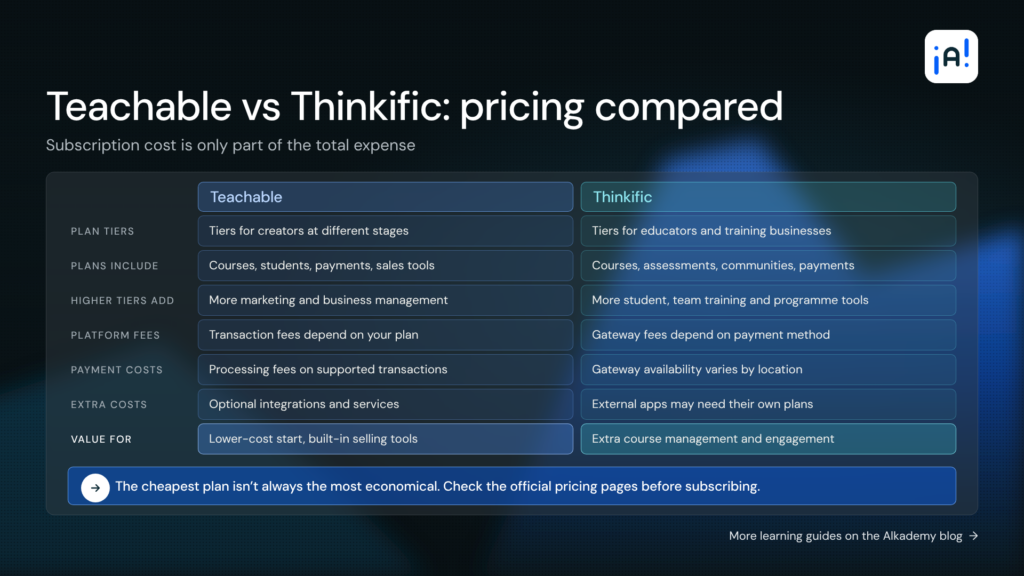
Teachable offers multiple subscription tiers designed for creators at different stages of their online education businesses.
Its plans provide access to course creation, student management, payment processing, and sales tools. Higher-tier subscriptions offer additional marketing, administrative, and business management capabilities.
Some plans also include platform transaction fees, so creators should consider these alongside the subscription cost.
Thinkific Pricing
Thinkific also offers multiple subscription tiers for independent educators and established training businesses.
Its plans provide different levels of access to course creation, assessments, communities, payment options, and administrative tools.
Higher-tier subscriptions offer additional capabilities for managing students, organisational training, and more complex learning programmes.
Transaction Fees and Additional Costs
Subscription costs are only part of the total expense.
Teachable:
- Platform transaction fees depend on the selected subscription plan.
- Payment processing fees apply to supported transactions.
- Optional integrations and additional services may introduce further expenses.
Thinkific:
- Payment processing fees depend on the gateway and payment method.
- Payment gateway availability varies by location.
- External applications may involve additional subscription costs.
Which Platform Offers Better Value?
Teachable may be more attractive to creators who want a lower-cost starting point and built-in selling features.
Thinkific may offer better value for educators who need additional course management and learning engagement capabilities.
However, the cheapest subscription is not necessarily the most economical choice. Consider your expected sales, transaction fees, required features, and additional software expenses.
For current plan details, consult the official Teachable pricing page and Thinkific pricing page before subscribing.
Teachable vs Thinkific: Which Platform Is Best for Different Users?
The best platform depends on your teaching approach and the type of online education business you want to build.
Beginners Creating Their First Online Course
First-time creators generally need a platform that is easy to understand and provides the essential tools for publishing their first course.
Teachable offers a straightforward course-building experience alongside payment and sales tools. Thinkific is also beginner-friendly, particularly for those who want to organise courses into structured lessons and learning activities.
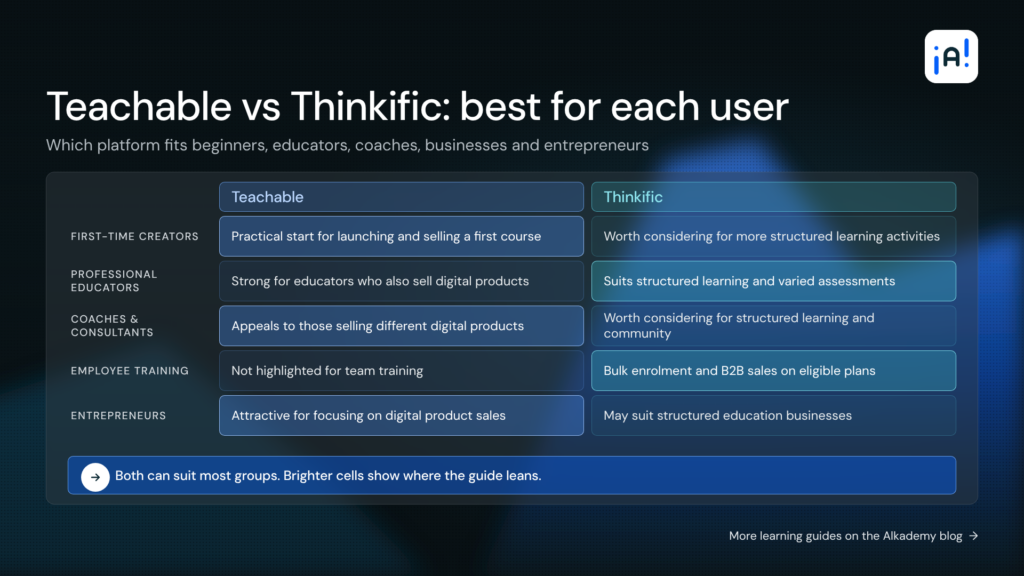
Recommendation: Teachable is a practical starting point for creators focused on launching and selling their first course. Thinkific is worth considering if your course requires more structured learning activities.
Professional Educators and Course Creators
Professional educators may need assessment tools, certificates, student management, and additional capabilities for delivering comprehensive learning programmes.
Recommendation: Thinkific may be more suitable for educators who prioritise structured learning and varied assessments. Teachable is a strong alternative for independent educators who combine teaching with digital product sales.
Coaches and Consultants
Coaches and consultants often package their knowledge into courses, coaching programmes, memberships, and downloadable resources.
Recommendation: Teachable may appeal more to consultants focused on selling different digital products. Thinkific is worth considering when coaching involves structured learning and community interaction.
Businesses Offering Employee Training
Businesses need tools that help them organise training materials, enrol employees, and deliver consistent learning experiences.
Thinkific offers organisational features such as bulk enrolment, B2B sales, and additional administrative capabilities on eligible plans.
Recommendation: Thinkific is worth considering for organisations that need structured training delivery and learner management. Businesses with more specialised workforce development requirements should also evaluate dedicated corporate learning platforms.
Entrepreneurs Building Online Education Businesses
Entrepreneurs need to consider customer acquisition, monetisation, administration, and long-term growth.
Recommendation: Teachable is attractive for entrepreneurs focused on digital product sales, while Thinkific may suit those building structured education businesses with different learning experiences.
Exploring Other Course Creation Opportunities
Choosing a course platform is an important step in building an online education business. Educators also need opportunities to create learning programmes, organise lessons, and reach students.
Alkademy supports educators through its instructor programme and teaching solutions.
Through its Instructor Programme, educators can create courses, host learning sessions, and reach learners.
Its Teaching and Learning Management Solutions also support course organisation, assessments, learning materials, and student progress tracking.
If you’re looking to turn your expertise into online learning experiences, explore Alkademy to discover how you can get started.
FAQs
Is Teachable better than Thinkific?
Teachable may be better for creators who prioritise selling courses, coaching services, and digital products. Thinkific may be more suitable for educators who need structured learning experiences, assessments, and community features. The right choice depends on your business model and educational goals.
What is the main difference between Teachable and Thinkific?
Teachable places considerable emphasis on course monetisation and digital product sales, while Thinkific focuses on structured course delivery, student engagement, and educational management. Both platforms support course creation and selling.
Is Teachable or Thinkific better for beginners?
Teachable is a practical option for beginners who want to launch and sell their first online course. Thinkific is also beginner-friendly, especially for those who want additional learning activities such as quizzes and assignments. Compare their available plans before deciding.
Can you sell online courses on both platforms?
Yes. Both Teachable and Thinkific allow creators to sell online courses. They support different monetisation options, including one-time payments, subscriptions, and payment plans, depending on the available features and payment setup.
Which platform is more affordable?
Teachable generally has a lower entry-level subscription cost, although transaction fees may affect overall expenses. Thinkific may cost more initially but offers different learning and course management capabilities. Compare subscription fees, payment processing charges, and the features you actually need.
Final Thoughts: Teachable vs Thinkific
Teachable is a good choice for creators focused on selling courses and digital products, while Thinkific suits educators who prioritise structured learning and student engagement.
Before deciding, consider your budget, course requirements, and long-term goals.
If you’re looking to turn your knowledge into online courses, Alkademy offers an instructor programme and teaching solutions to help educators create and deliver learning experiences.